
Google as a Shopping Tool: Save Money by Searching
by Ann Smarty
While most of people I know use Google for daily searching, only few of them know how to actually search (apart from providing a search term and hitting “Search”).
Only few people know that Google may prove really useful for saving money and developing a smart shopping strategy – especially during the holiday season when everyone is trying to buy something and you should stay cool and clever enough to stick to your budget.
Let me share a few advanced tips for you to learn to save money with Google:
Use Google Shortcuts
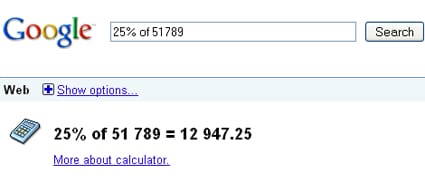
Google offers quite a few shortcuts allowing to perform simple actions that can make your life much easier.
Google calculator
supports plenty of functions allowing you to quickly calculate a discount or figure the order total:
| Function | Operator | Example |
|---|---|---|
| Addition | + | [4.99+7.99+6.78 ] |
| Subtraction | – | [54-12 ] |
| Multiplication | * | [34*76 ] |
| Division | / | [654 / 13 ] |
| Percent | % of | [25% of 150 ] |
| Exponentiation (raise to a power of) | ^ or ** | [4^10 ] or [4**10 ] |
| nth root | the nth root of | [5th root of 25 ]] |
Google currency converter
is particularly useful for international shopping. It is available as a separate tool or can be used within General search. Just type something like 3USD in EURO and you are good. Other possible formats to use (that work):
- 3$ in EURO
- convert 3$ in EURO
- usd to gbp exchange rate
- usd to euro conversion
Use Google Sidebar Options
Google has recently introduced a really helpful feature: it hides behind “Show options” under the search field. The feature gives you a few nice options like price comparison and date search.
Google as a Real-Time Search
Google now allows to easily check latest updates on anything you need. This can be really handy if you need to find out what people are saying right now about the product or a seller you are considering. Search for the product or a seller name, click “Show options” link, then choose any link under “Any time“.
Now with a bit of hacking you can even see last minute’s results. Just insert qdr:n in the search URL string:

Google as a Price Comparison Tool
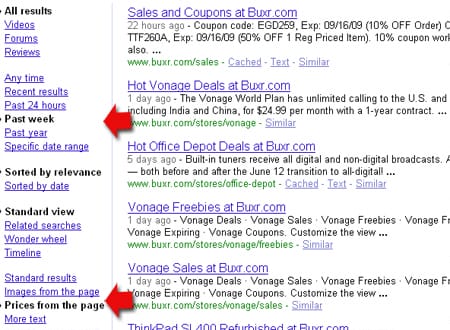
Search for whatever you are planning to buy, then click “Show options” link, then choose Prices from the page (the lowest block):

Google to Show Customer Reviews
That’s my old tradition to search for user reviews before considering any product. Now, this can be done with Google’s options search: just search for the product, click “Show options” link, then choose Reviews:

Use Google Advanced Operators
Basically speaking, Google advanced operators are commands used to combine keywords to broaden or narrow your search. Here are a few that I use for shopping-related queries:
site:
Narrows the search to one particular site
I use site: operator to search within my favorite coupon site – Buxr.com because this gives me the ability to use all beautiful Google search options described above:
Example: search Buxr + display prices with search results + view only recent updates (e.g. one week late):
– (Minus Sign)
Excludes a word from search results
This one turns particularly useful when most search results contain a product from one most popular manufacturer – and you want to see more options.
Example: [laptops -dell]
* (Asterisk)
Adds a word (or several words) to the search query
This one can be used when you are not sure which manufacturer you would like to choose and need to see more options
Example:
[cheap * laptops]

Now, think how many options you are getting when you combine several of the above search hacks! You can find almost anything! Just use Google creatively and you will find the latest deals and choose the best product.
The guest post is by Ann Smarty, a blogger, search marketer and social media enthusiast. If you feel like, follow Ann on Twitter!

I use the Google shopping search when doing projects for school. It’s helpful when you’re on a budget. 🙂
I use the Google shopping search when doing projects for school. It’s helpful when you’re on a budget. 🙂
OH! You’re my new favorite blogger fyi
The shortcuts are cool but usually use google more when price comparison or looking for online ecommerce stores that would have lower prices than in store.
Great info. I actually had a class on just searching in high school. Its amazing how many people dont know how to search the internet.
I used Google to find a digital camera, but it led me astray: I ended up buying one from a pretty disreputable site. I know the onus was on me to do more research, but I found a site that had a much cheaper Canon camera than the other sites.
It was too good to be true — the site was rip-off, and I ended up paying MORE than other sites. (Long story.) I got the camera I wanted, but it was a huge hassle.
Bottom line: Use google, but be sure to do some research on the site to make sure they’re on the up-and-up.
Tһis is a topic whch is cloose tto mү
heart… Many thanks! Εxactly ԝɦere aare ʏߋu contact details though?